# Quick start
> Your first task in about a minute. The three-step tour picks your model, sets how you capture, and turns a sample message into a task.
Source: https://todocity.app/docs/quick-start
The first time you open TodoCity, a short tour walks you through three steps: **Model**, **Shortcut** and **Try it**. It takes about a minute, and you can change any of it later in Settings.
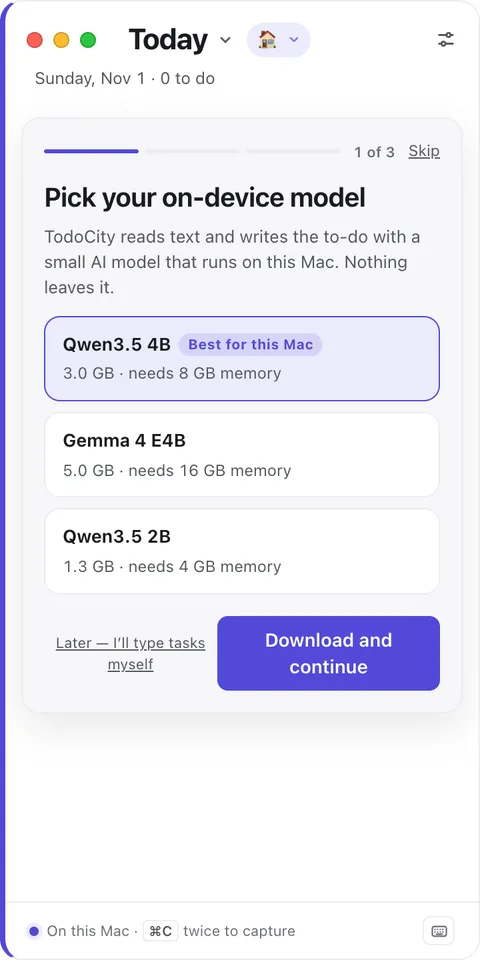
## 1. Model
**Pick your on-device model.** TodoCity uses a small AI model, running right on this Mac, to read the text you capture and write the task. The one marked **Best for this Mac** is the one that fits your Mac's memory.
- Click **Download and continue**. The model only downloads once, and you can keep going with the tour while it does.
- If you'd rather type your tasks yourself for now, click **Later — I'll type tasks myself**. You can add the model whenever you like in **Settings → Open models**.
## 2. Shortcut
**How do you want to capture?** Pick one:
- **Press ⌘C twice** is the easiest. Copy as you normally would, press ⌘C once more, and TodoCity picks it up. It works in every app and doesn't need any permission.
- **A shortcut, like ⇧⌘S,** lets you skip copying altogether: just select text and press it. For this, TodoCity needs Accessibility access, so click **Allow in System Settings** and turn on TodoCity. [Install](https://todocity.app/docs/install#permissions-todocity-asks-for) explains why.
## 3. Try it
The tour gives you a sample message to practise on:
> Could you send me the Q3 numbers by Friday 3pm? Thanks!
1. **Select the message**, then press ⌘C twice (or your shortcut).
2. **Check the card** that drops down from the menu bar. TodoCity has written the task and understood “by Friday 3pm” as Friday at 3:00 PM.
3. **Press Return.** That's your first task in TodoCity.
Rather not select anything? Click **Or just use the sample** instead. When you're done, click **Start using TodoCity**.
If the model is still downloading, or you chose **Later**, the card opens for you to fill in yourself this time. Everything else works exactly the same.
> [!NOTE]
> Once you finish the tour, macOS asks whether TodoCity can send you notifications. Say yes if you'd like reminders when tasks are due. More in [Notifications](https://todocity.app/docs/notifications).
## Next steps
- [Capture text](https://todocity.app/docs/capture) All the ways to turn text into a task.
- [Today](https://todocity.app/docs/today) Where your tasks show up, and how to plan your day.
- [Your city](https://todocity.app/docs/city) Every project becomes a building. Name your city and meet the mayor.
Want to see the tour again? It's in **Settings → Help → The tour**.