Apple Calendar
See your meetings beside your tasks, and put timed tasks in Apple Calendar, one calendar per project, kept in step both ways.
Settings → Connectors → Apple Calendar does two separate things, each with its own switch. It can show your meetings beside your tasks, and it can put your tasks into Calendar.
Show your meetings in TodoCity
- Open Settings → Connectors → Apple Calendar and click Connect. When macOS asks, let TodoCity use your calendars.
- Turn on Show calendar events in TodoCity.
- Tick the calendars you want under Calendars to show.
Your meetings then appear next to your tasks in Today and Calendar. They come from the Calendar app on your Mac, so any Google, Outlook or iCloud calendars you've added there are included. You can drag your own meetings to move them. Everything else stays just as it is in Calendar.
Each mode can also show its own set of calendars.
Private by default
Your events stay on this Mac. TodoCity just reads them from the Calendar app so it can show them to you.
Put your tasks in Calendar
When you turn on Put my tasks in Calendar, any task with a day and a time shows up as an event in Apple Calendar.
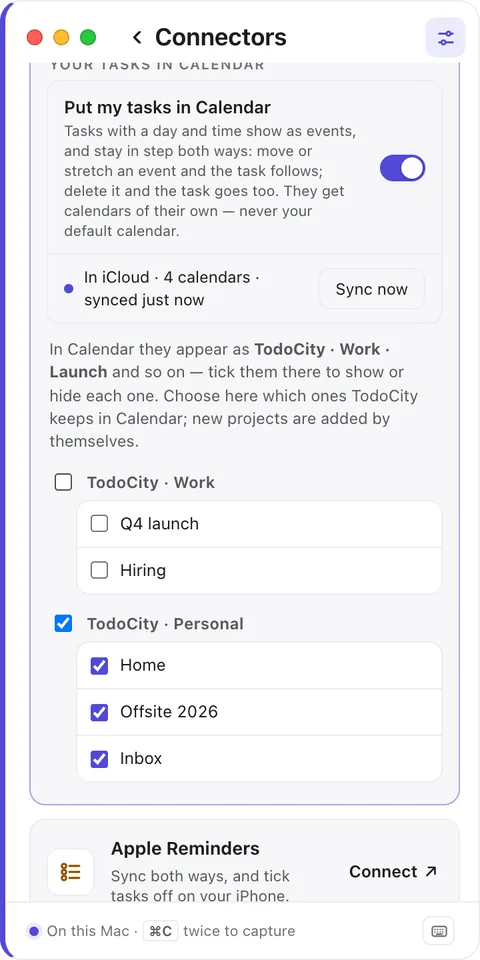
- Each project gets its own calendar. TodoCity's calendars are grouped by mode, with names like TodoCity · Work · Launch and TodoCity · Personal · Home, and you can tick them in Calendar to show or hide each one. TodoCity never touches your default calendar.
- Choose which projects go to Calendar using the boxes under each group, or pick Sync every project in a group. New projects get added automatically.
- Keep them in whichever account you like. iCloud shows them on your iPhone too, while On My Mac keeps them on this Mac.
Both ways
- Move or stretch an event in Calendar, and the task's time and length update to match.
- Delete the event, and the task is deleted too.
- Change the task in TodoCity, and its event updates.
If a large batch of deletes comes through all at once, a safety brake holds it back, so one slip in Calendar can't wipe out your lists.
What stays out of Calendar
- Tasks that don't have a time.
- Projects under Keep on this Mac only in Settings → Your other Macs.
TodoCity also leaves its own calendars out of the meetings it shows you, so you'll never see a task twice.
Private by default
If you use an iCloud account, your tasks' events sync through iCloud, which means they leave this Mac. Pick On My Mac to keep them local. Projects set to Keep on this Mac only never go to Calendar.
With two Macs
Every event carries a link back to its task. So if two of your Macs both put tasks in Calendar, they share the same event rather than adding it twice.