Things 3
Bring your whole Things 3 library into TodoCity on your Mac, and keep new to-dos and changes in Things flowing in.
Settings → Connectors → Things 3 brings your entire Things 3 library into TodoCity. It all happens on your Mac. TodoCity reads a copy of Things' database and leaves Things itself untouched, so you can keep using it while you try TodoCity out.
Move in
- Open Things 3 on this Mac and let it finish syncing, so that this Mac has all your to-dos. If you only use Things on your iPhone or iPad, install Things 3 for Mac and sign in to Things Cloud first.
- In TodoCity, click Find my Things library in Settings → Connectors → Things 3. If macOS asks whether TodoCity can access data from other apps, click Allow.
- Check the preview. Untick any projects you'd rather leave behind, and decide whether to Bring the Logbook and Bring cancelled to-dos.
- Keep in sync if you like. Leave it on, and new to-dos and changes in Things keep coming into TodoCity by themselves.
- Click Import. TodoCity makes a backup of itself first, in Settings → Backups & export, marked before import, so you can undo the import.
If you run it again later, it only brings in to-dos that are new since last time, even if you've deleted some in TodoCity since.
Keep in sync
With Keep in sync on, new to-dos and changes you make in Things come into TodoCity by themselves. Anything you edit in TodoCity stays in TodoCity, and you can still edit synced tasks freely.
- To stop syncing one project, use its ⋯ menu in the sidebar. Its tasks stay in TodoCity.
- To stop syncing all of Things, click Stop syncing on its card in Settings → Connectors.
- Sync now on the card brings in changes straight away.
What goes where
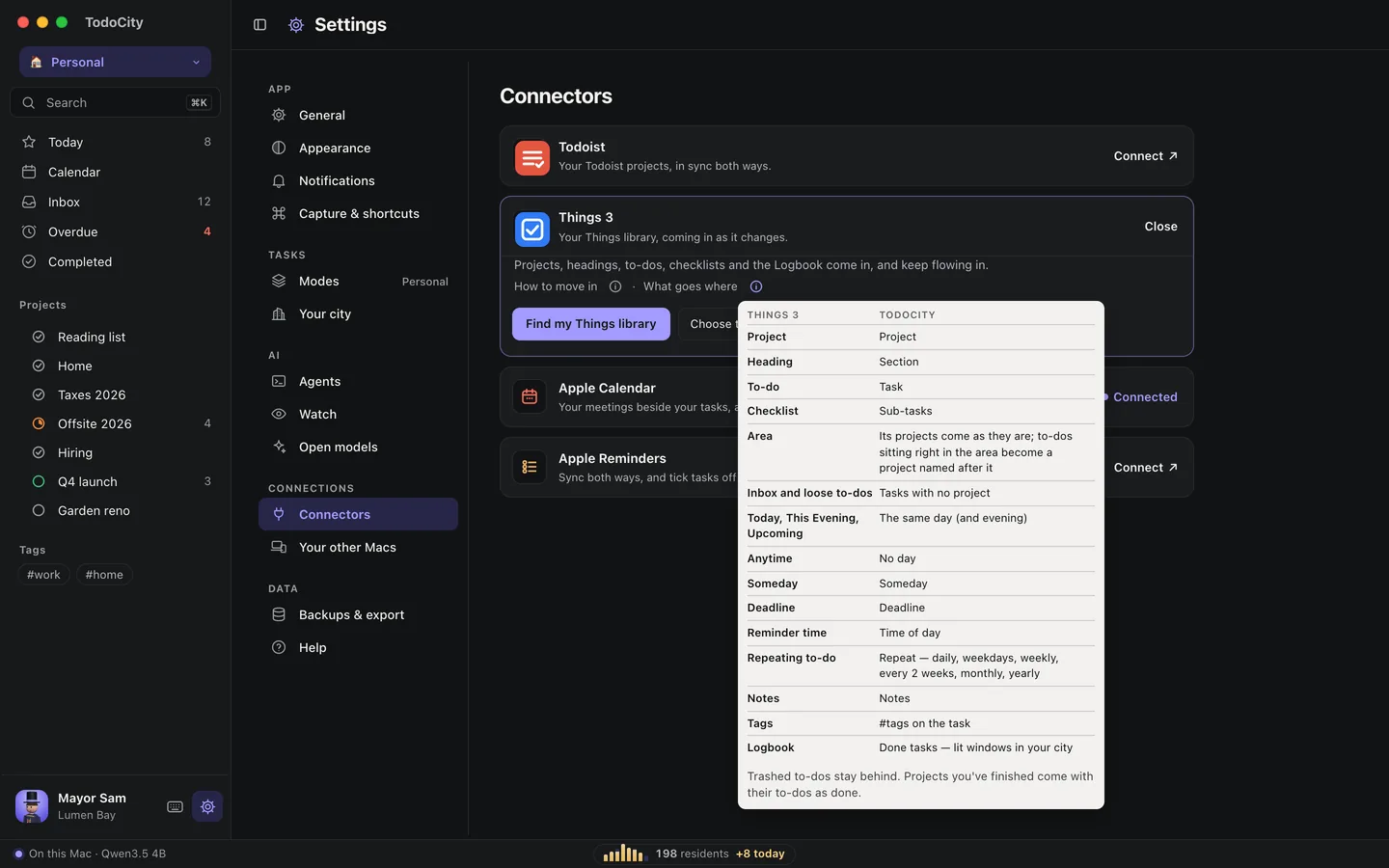
| Things 3 | TodoCity |
|---|---|
| Project | Project |
| Heading | Section |
| To-do | Task |
| Checklist | Sub-tasks |
| Area | Its projects come over as they are, and any to-dos sitting directly in the area become a project named after it |
| Inbox and loose to-dos | Tasks with no project |
| Today, This Evening, Upcoming | The same day (and evening). Today items left over from earlier days come in for today |
| Anytime | No day |
| Someday | Someday |
| Deadline | Deadline |
| Reminder time | Time of day |
| Repeating to-do | The same repeat if it's daily, weekdays, weekly, every 2 weeks, monthly or yearly. Other patterns come over once, with a note so you can pick a repeat |
| Notes | Notes |
| Tags | #tags on the task |
| Logbook | Done tasks |
To-dos in the Trash stay behind. Projects you've finished come over with their to-dos marked done.
Find your library yourself
If Find my Things library can't find it, click Choose the database myself… and point TodoCity to it:
- In Finder, choose Go → Go to Folder… and paste
~/Library/Group Containers/JLMPQHK86H.com.culturedcode.ThingsMac - Open the
ThingsData-…folder. - Pick
Things Database.thingsdatabase.
If macOS asks for permission, give TodoCity Full Disk Access in System Settings → Privacy & Security. Alternatively, copy that folder to your Desktop first and choose the copy.
Private by default
Moving in from Things happens entirely on your Mac. TodoCity reads a copy of the database, and nothing gets sent anywhere.